
How to Change UNN Student Profile Password for both new and Returning Students.
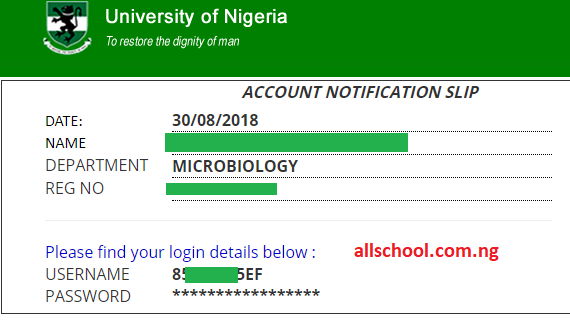
As a student newly admitted into University of Nigeria Nsukka (UNN), you must create a student profile in UNN portal. To create a student profile you must verify your account. While verifying your account, you will see your username and password.
In recent days, we have been informed that some new students password has been changed without the permission of the newly admitted students changed their password. In this post, we will show you how to change the password back to your desired password. We will also show returning students how to change their password.
Recommended: Total Estimated Expenses for UNN Newly Admitted Students.
Page Contents
How to Change UNN Student Profile Password
The step should be used if you’re new to the UNN portal and yet to create the student profile. If you have created the profile, use the second step.
Change UNN Student Profile Password for New Students
- visit the unn portal
- Go to the verification portal by clicking on “account”>>>>>signup
- then click on new student and enter your jamb registration number. Your username and password should be your JAMB Registration and the password is not meant to be in asterisks. If your password is in asterisks *** then follow the steps below to change your password.
- Visit the UNN ICT Support Website
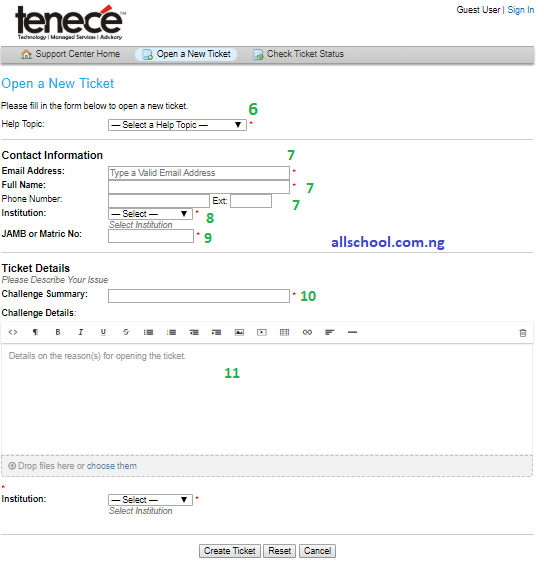
- Click on “Open a New Ticket;” to create a ticket.
- In the “Help Topic” select “Login Challenge” in the drop down menu,
- Enter your email address, full name and phone number in the accurate column,
- Select UNN As Institution
- Enter your Accurate JAMB Registration Number in the appropriate column
- In Challenge Summary, Just write “Change my UNN Password“
- In the Challenge Details, Just summarize your problem. tell the ICT support to change your password and make sure you state your jamb registration number, and the new password you want.
- lastly, select UNN as Institution.
- You password will be changed within 48hours.
- To confirm it, just use your jamb registration number and new password to login to the UNN Portal.
SEE ALSO: UNN Clearance Documents for Newly Admitted Students.
JOIN our UNN Facebook Group for Aspirants & Students, all UNN news are posted on the group. Some important info not share on this website are also available on the page.
Change UNN Student Profile Password for Returning Student
This step is for new students who chose their password themselves but for some reasons wants to change the password. Returning students can also use the steps below to change their password.
- Visit UNN Student Portal:
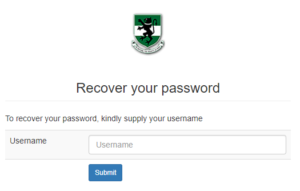
- Click on “account”>>>>>Forgot Password
- Enter your username in the space provided (Matric Number for returning students and jamb registration number for candidates who don’t have matric number)
- Click on Submit and verify your email address.
- A link to recover your password will be sent to your email,
- Check your email and click the link to recover your password.
JOIN our UNN Facebook Group for Aspirants & Students, all UNN news are posted on the group. Some important info not share on this website are also available on the page.
See latest UNN News HERE.
Stories You Shouldn't Have Missed:
- I Wan Marry Her: Female Graduate Makes Colleagues Lose Focus with Her Hot Legwork, Video Causes Stir
- From School Teacher to International Model, Varsity Graduate Celebrates
- Brilliant Girl Who Emerged Varsity’s Youngest Student at 13, Clocks Another Milestone As She starts Her PhD at 18
- Moment Man bumped into his ‘wicked secondary principal’ who doubted his ability to make it in life
- Why I Aspire to Lead My Department – LASU’s 19-Year-Old Bakare Adeola Zainab shares
- Corps Member in Tears as She Honors Sister Who Sold Her Gold to Support Her
- Corps Member Disappears After Defiling 12-Year-Old Pupil In Bayelsa
Join Our 500,000+ Community:
Thank you so much for reading. We will appreciate it if you share this with your loved ones.