
University of Nigeria Nsukka, UNN Acceptance Fee Payment Procedure for 2023/2024 Academic Session. You will also see how to create your student profile on UNN Portal.

I will start by congratulating students who made it to the UNN First batch admission list. I am a student of the University of Nigeria Nsukka and I will be pleased to see you in your Matriculation.
Now that you have made been admitted to UNN, the next step is accepting the admission. To accept UNN admission, you will have to pay Thirty thousand naira (N30,000) as an acceptance fee. Kindly follow the procedure below to pay your acceptance fee.
RECOMMENDED: How to get Good Off-Campus Accommodation in UNN?
How to Create UNN Student profile.
We recommend using a desktop computer if you want to make the payment yourself.
Step One: Confirm your Details on Portal
- Visit UNN Portal via (unnportal.unn.edu.ng).
- Click on Undergraduate students and click signup.
- In the page that will display, choose “New Student”, enter your JAMB Reg. Number and RR Number (the one you used during post utme registration) and click on “Submit”.
- Your login details will display.
Did you misplace your Post UTME Application Remita Number and need it back? Then call Remita support via +234-1-6367000 or +234700-7877678.
STEP TWO: Create a New Password and Complete your Student Profile
- The revisit UNN portal via (unnportal.unn.edu.ng) and enter that your login credentials and click “LOGIN”.
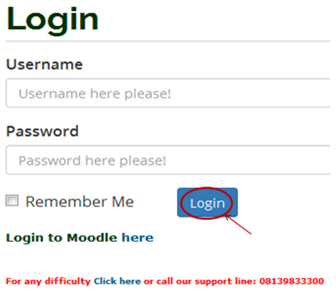
- Change your Password by entering “old password”, “new password”, and confirm the new password.
- Under Profile, Locate “student Profile details”. Update your Bio data. and click SUBMIT.
- Your welcome page will show. If it does, move to the next step. unn student dashboard welcome page
STEP THREE: Generate invoice and pay acceptance fee
NOTE: You MUST fill your bio-data before you can pay acceptance fee.
- From the menu items on the left, click on the drop down button on “ACCEPTANCE” as shown above, to see the next screen as shown below. Observe the dropdown menu under “ACCEPTANCE”.
- Step Five: Click on “Get acceptance invoice”, as shown above. When the page loads successfully, choose 100level (for UTME) or 200level (for DE)”entry level” and click on generate. The page below will display. Write down your Remita Retrieval Reference (RRR) Number.
If you want to pay the UNN acceptance fee in a BANK Branch, then print out the page, proceed to bank and make payment. After which revisit the portal and continue with step 7. But if you want to make payment yourself, then coninue with the next step.
- Scroll down and click on “Click here to pay with your ATM/Web pay”. Enter your ATM card details. If you are using Visa card, make sure you have your Visa iPin. Once the payment is successful, re-do step 1-3. You will see the page below.
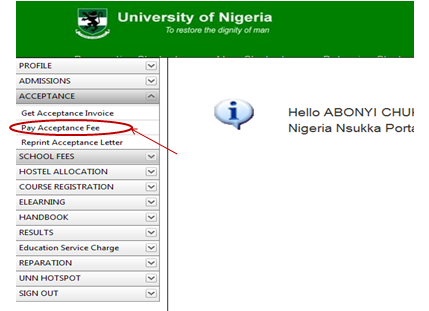
- Click on “Pay Acceptance Fees”, as shown above, the screen below will appear.
- Remember I told you to take note of your RRR number, Its time to use it. Enter the RRR number as shown above choose session and click on submit (as shown above). Your Acceptance fees receipt will appear.
- Print out the receipt. If you still have complaints or questions, drop them in the comment box below!
Please take your studies in UNN very serious! Once more, congratulations on your admission into UNN. You can JOIN UNN Aspirants Group at UNN Facebook Aspirants Group.
Recommended Articles:
- Check Out Trending Schools Gist
- List Of Schools Whose Post UTME Forms are on Sale
- Top 5 Must-Have for Freshers in Any Nigerian Higher Institution
- 15 Types of Roommates You Will Find in School
- 5 Reasons Most Students Are Not Offered Admission Despite High Post-utme Score
- Jamb Alternatives: 5 Best Ways To Gain Admission Into A University Without JAMB
- Ten Things Every Jambite Must Know Before Entering The University
- 10 Secrets to Making Straight A’s in Varsity of Poly
- Mistakes Students should never Make in Tertiary Institutions
ALLSCHOOL TEAM
Stories You Shouldn't Have Missed:
- FUOYE gets NUC’s full accreditation for 6 academic programmes
- How School Principal Operated 3 Higher Institutions in Three Clasrooms, Collected N3.88 Million From Admission Seekers
- “Please Help Us”: Teacher Recounts How Bandits Kidnapped Over 300 Pupils and Staff in Niger State
- Woman Sets Record as Family’s First Graduate, Earns Engineering Master’s in Europe
- Policeman Sentenced to Death for Killing UNIJOS Student
- Anambra State Commissioner Adopts Mmesoma, Aims to Support her Aspirations
- Two men nabbed while trying to kidnap UNILAG Student (video)
Join Our 500,000+ Community:
Thank you so much for reading. We will appreciate it if you share this with your loved ones.