
JAMB Original Result: How to Check Unified Tertiary Matriculation Board (UTME) Original Result. This is for all years! It will cost you some money before JAMB will give it to you.
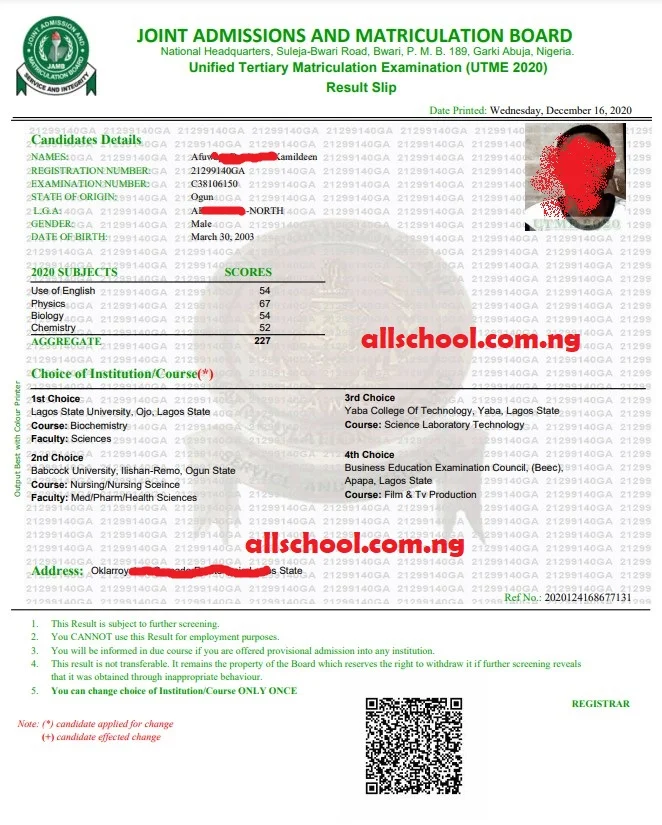
This page is for candidates who have written the JAMB Exam and want to check their JAMB Original Result.
The JAMB original result is the result that contains the candidate’s score, passport photograph, choice of institution/course, etc.
UPDATE: The JAMB Original Result for 2025 Candidates is out.
How Much is JAMB Fee:
The official fee for JAMB Original Result is One Thousand, Five Hundred Hundred (N1,500). Bank and Computer Center fees might amount to a total of N3,000, depending on the place.
How to Print JAMB Original Result.
Follow the steps below to print out the original UTME result on JAMB portal:
- Login to your JAMB profile through https://efacility.jamb.gov.ng/.
- Once logged in, you will be taken to a page where you will see all available services.
- Click on “Print Result Slip”.
- Review the details displayed on the Confirmation Page.
- Select your desired payment method and proceed with the payment
- After payment, login to jamb portal, click on My Payments you will see it in the menu sidebar. Then click on get status. If your payment is approved, click on CONTINUE.
- You will be directed to the result printing page.
- You will be asked to provide the following:
- Year of Exam and
- JAMB Registration Number.
- After entering the information correctly, you can now print the Result Slip.
Once more it’s very important to note that the steps above will work since the JAMB Original result is officially out. You should also use a desktop computer or laptop, although it will work on some mobile phones. Finally, we recommend you use a Google Chrome browser.
If you still have any questions, feel free to ask us using the comment box below, and we will answer you as soon as we can.
Recommended JAMB Articles
- Practice Real JAMB Past Questions with ALLSCHOOL JAMB CBT App
- Install LitTexts App: 2026 Literature Prose, Drama, & Poetry at your fingertips.
- How to Score Extremely High In JAMB [7 Trusted Tips]
- JAMB Free Tutorials [Free]
- All JAMB News and Updates
- Download JAMB Novel – The Lekki Headmaster [Free PDF]
- Likely Questions And Answers From The Life Changer
- When is the JAMB Exam Starting?
- JAMB Runs is FAKE
- Idioms You Might See in Your English JAMB Questions [Hurry, Check Them Out!]
- JAMB Syllabus for All Subjects [Official & Updated]
- Updated Accredited JAMB CBT Centers in Nigeria.
- How to Register for JAMB In Just 3 Steps [Everything you need to know]
- How Much Is JAMB Form 2025
- Solutions to Profile Code Issues [Get Yours Fixed Instantly]
- How to Fill JAMB Form the Right Way [Avoid Silly Mistakes]
- JAMB Brochure: JAMB Subject Combination for all Courses
ALLSCHOOL TEAM
Stories You Shouldn't Have Missed:
- History Made: Excitement As 18-Year-Old Jaylen Smith Becomes America’s Youngest Black Mayor
- Female Student Fatally Stabs Colleague to Death
- Lady Who Wrote JAMB 6 Times Celebrates As She Finally Graduates from University
- Former University of Abuja Vice-Chancellor, Prof. Nuhu Yaqub, Passes Away at 73
- ESUT Suspends Three Lecturers and Student Over Alleged Grade Manipulation and Extortion
- UNN Student Triumphs in 6th Fisayo Soyombo Inter-Varsity Essay Contest
- Lady heartbroken as 6-year relationship ends on her convocation day
Join Our 500,000+ Community:
Thank you so much for reading. We will appreciate it if you share this with your loved ones.