
FUGASHUA Post UTME: Federal University Gashua, Yobe (FUGASHUA) Post UTME / Direct Entry Screening Registration for the 2025/2026 Session is Out. The closing date is on Sunday, 28th September 2025. The cut-off mark is 150 and above. Form cost N2,000.

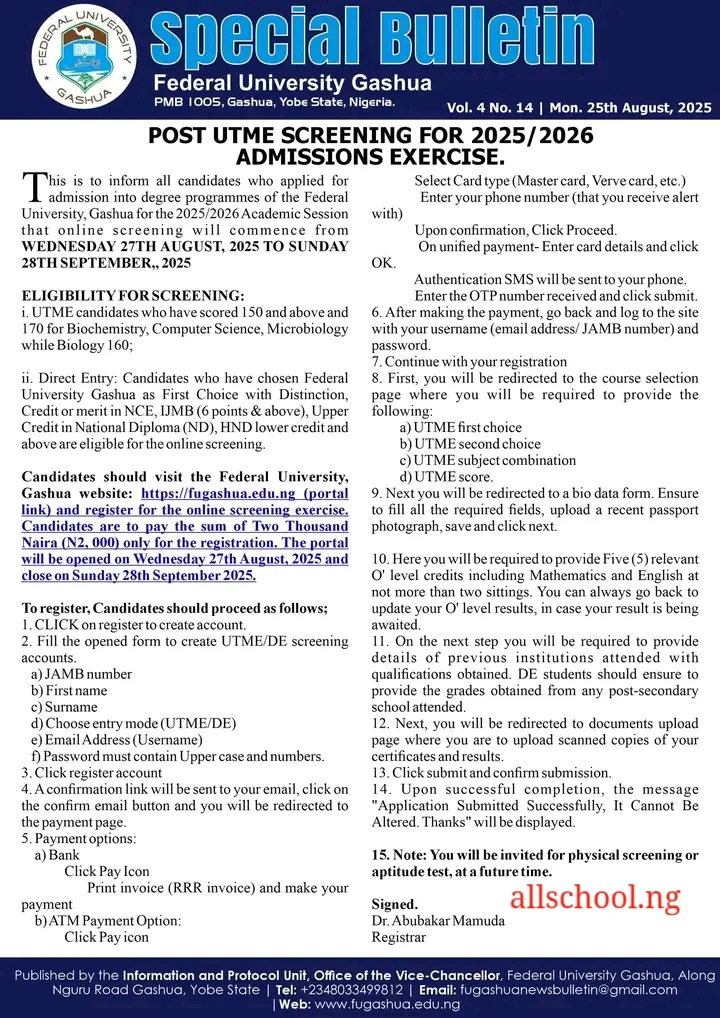
This is to inform the public especially prospective students of Federal University Gashua, Yobe (FUGASHUA) that the FUGA Post UTME / Direct Entry Form for the 2025/2026 academic session will be on sale from the Wednesday 27th August, 2025 and close on Sunday 28th September 2025..
RECOMMENDED LINKS:
Please Note: FUGASHUA will only conduct online screening this year. You will not be invited for physical screening or aptitude test.
Page Contents
Candidates Eligible to Apply
- UTME: UTME candidates who have scored 150 and above and 170 for Biochemistry, Computer Science, Microbiology while Biology 160;.
- Direct Entry (DE): Candidates who have chosen Federal University Gashua as First Choice with Distinction, Credit or merit in NCE, IJMB (6 points & above), Upper Credit in National Diploma (ND), HND lower credit and above are eligible for the online screening.
How to Pay for FUGASHUA Post UTME Screening
Candidates should visit the Federal University, Gashua website: https://fugashua.edu.ng (portal link) and register for the online screening exercise. Candidates are to pay the sum of Two Thousand Naira (N2, 000) only for the registration. The portal will be opened on Wednesday 27th August, 2025 and close on Sunday 28th September 2025.
To register, Candidates must proceed as follows;
--Content Continues after this short break:--
2026 POST-UTME EXAM: Thousands of students will compete for small admission slots this year. Don’t wait till the exam is close before preparing. Join the ALLSCHOOL POST-UTME Online Lesson and start preparing early to secure your admission!
JOIN NOW

---------------
GUARANTEE YOUR ADMISSION: DON'T let Low Screening Score STEAL your Admission this year. Study with your school's Original PDF Post UTME Past Questions, Mock Exam and more CLICK HERE TO INSTALL APP
--Content continues below--
- CLICK on register to create account.
- Fill the opened form to create UTME/DE screening accounts.
- JAMB number
- First name
- Surname
- Choose entry mode (UTME/DE)
- Email Address (Username)
- Password must contain Upper case and numbers.
- Click register account.
- A confirmation link will be sent to your email, click on the confirm email button and you will be redirected to the payment page.
- Payment options:
- a) Bank
- Click Pay Icon
- Print invoice (RRR invoice) and make your payment
- b) ATM Payment Option:
- Click Pay icon
- Select Card type (Master card, Verve card, etc.)
- Enter your phone number (that you receive alert with)
- Upon confirmation, Click Proceed.
- On unified payment- Enter card details and click OK.
- Authentication SMS will be sent to your phone.
- Enter the OTP number received and click submit.
- After making the payment, go back and log to the site with your username (email address/ JAMB number) and password.
- Continue with your registration.
- First, you will be redirected to the course selection page where you will be required to provide the following:
- a) UTME first choice
- b) UTME second choice
- c) UTME subject combination
- d) UTME score.
- Next you will be redirected to a bio data form. Ensure to fill all the required fields, upload a recent passport photograph, save and click next.
- Here you will be required to provide Five (5) relevant O’ level credits including Mathematics and English at not more than two sittings. You can always go back to update your O’ level results, in case your result is being awaited.
- On the next step you will be required to provide details of previous institutions attended with qualifications obtained. DE students should ensure to provide the grades obtained from any post-secondary school attended.
- Next, you will be redirected to documents upload page where you are to upload scanned copies of your certificates and results.
- Click submit and confirm submission.
- Upon successful completion, the message “Application Submitted Successfully, It Cannot Be Altered. Thanks” will be displayed.
- You will not be invited for physical screening or aptitude test, you will be notified once admitted through your CAPS.
Closing Date: The closing date is on Sunday, 28th September 2025
Registrar.
Recommended Articles:
- Check Out Trending Schools Gist
- List Of Schools Whose Post UTME Forms are on Sale
- Top 5 Must-Have for Freshers in Any Nigerian Higher Institution
- 15 Types of Roommates You Will Find in School
- 5 Reasons Most Students Are Not Offered Admission Despite High Post-utme Score
- Jamb Alternatives: 5 Best Ways To Gain Admission Into A University Without JAMB
- Ten Things Every Jambite Must Know Before Entering The University
- 10 Secrets to Making Straight A’s in Varsity of Poly
- Mistakes Students should never Make in Tertiary Institutions
ALLSCHOOL TEAM
Stories You Shouldn't Have Missed:
- All is Never Lost With Perseverance — 2023 JAMB Candidate Who Scored 275
- Man Bags Two Degrees with First Class within 5 Years in Two Countries
- Female Graduate Who Sells Akamu In Tears As Thieves Steal Her Grinding Engine
- Woman Celebrates as Girl She Sponsored for WAEC in 2023 Passes All Subjects
- Nigerian Girl, Chinasa Isabella, Emerges the 2021 Overall Best WASSCE Candidate in West Africa
- From Classroom Enemies to Lifelong Lovers: The Love Story of Tiwalola and Her Soulmate
- First class Graduate Of UNN Breaks His Department’s Record Of 62 Years
Join Our 500,000+ Community:
Thank you so much for reading. We will appreciate it if you share this with your loved ones.