
IAUE School Fees: Ignatius Ajuru University of Education (IAUE) School Fees for the 2025/2026 Academic Session have been released. See the fees below.

This is to inform both fresh and stale undergraduate students of the Ignatius Ajuru University of Education (IAUE), Rumuilumeni, Port Harcourt that the management of the institution has published the amount they are required to pay as school fees for the 2025/2026 academic session.
On this page, we will show you a complete breakdown of the school fees for both Indigene and Non-Indigene students. You will also see the school fees for all level of students.
Page Contents
IAUE School Fees 2025/2026
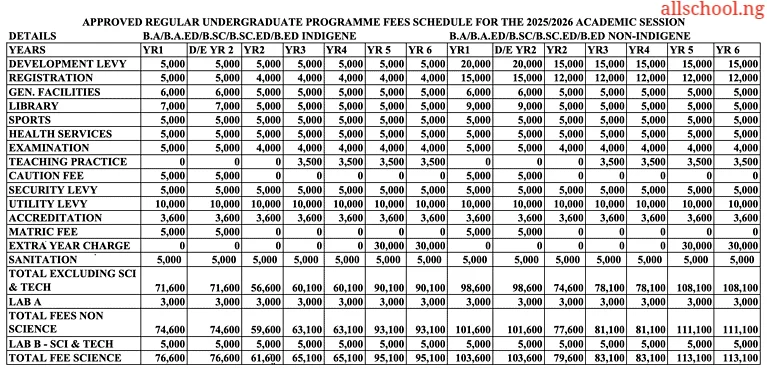
NB: Scroll/swipe the table below to view full details.
School Fees Schedule (Indigene Students)
B.A / B.A.ED / B.Sc / B.Sc.ED / B.Ed
- Year 1 (100 Level): ₦71,600 (Excluding Science & Tech) | ₦74,600 (Non-Science) | ₦76,600 (Science)
- Direct Entry (200 Level): ₦71,600 (Excluding Sci & Tech) | ₦74,600 (Non-Science) | ₦76,600 (Science)
- Year 2 (200 Level): ₦56,600 (Excluding Sci & Tech) | ₦59,600 (Non-Science) | ₦61,600 (Science)
- Year 3 (300 Level): ₦60,100 (Excluding Sci & Tech) | ₦63,100 (Non-Science) | ₦65,100 (Science)
- Year 4 (400 Level): ₦60,100 (Excluding Sci & Tech) | ₦63,100 (Non-Science) | ₦65,100 (Science)
- Year 5 (500 Level): ₦90,100 (Excluding Sci & Tech) | ₦93,100 (Non-Science) | ₦95,100 (Science)
- Year 6 (600 Level): ₦90,100 (Excluding Sci & Tech) | ₦93,100 (Non-Science) | ₦95,100 (Science)
School Fees Schedule (Non-Indigene Students)
B.A / B.A.ED / B.Sc / B.Sc.ED / B.Ed
- Year 1 (100 Level): ₦98,600 (Excluding Science & Tech) | ₦101,600 (Non-Science) | ₦103,600 (Science)
- Direct Entry (200 Level): ₦98,600 (Excluding Sci & Tech) | ₦101,600 (Non-Science) | ₦103,600 (Science)
- Year 2 (200 Level): ₦74,600 (Excluding Sci & Tech) | ₦77,600 (Non-Science) | ₦79,600 (Science)
- Year 3 (300 Level): ₦78,100 (Excluding Sci & Tech) | ₦81,100 (Non-Science) | ₦83,100 (Science)
- Year 4 (400 Level): ₦78,100 (Excluding Sci & Tech) | ₦81,100 (Non-Science) | ₦83,100 (Science)
- Year 5 (500 Level): ₦108,100 (Excluding Sci & Tech) | ₦111,100 (Non-Science) | ₦113,100 (Science)
- Year 6 (600 Level): ₦108,100 (Excluding Sci & Tech) | ₦111,100 (Non-Science) | ₦113,100 (Science)
Component Breakdown (Applicable to Both Indigene and Non-Indigene)
- Development Levy: ₦5,000 (Indigene YR1–YR6) | ₦20,000 (Non-Indigene YR1) | ₦15,000 (Non-Indigene YR2–YR6)
- Registration: ₦5,000 (YR1 & D/E YR2) | ₦4,000 (YR2–YR6, Indigene) | ₦15,000 (Non-Indigene YR1 & D/E YR2) | ₦12,000 (Non-Indigene YR2–YR6)
- General Facilities: ₦6,000 (YR1 & D/E YR2) | ₦5,000 (YR2–YR6)
- Library: ₦7,000 (YR1 & D/E YR2, Indigene) | ₦5,000 (YR2–YR6, Indigene) | ₦9,000 (YR1 & D/E YR2, Non-Indigene) | ₦5,000 (YR2–YR6, Non-Indigene)
- Sports: ₦5,000 (All Years)
- Health Services: ₦5,000 (All Years)
- Examination: ₦5,000 (YR1 & D/E YR2) | ₦4,000 (YR2–YR6)
- Teaching Practice: ₦0 (YR1–YR2) | ₦3,500 (YR3–YR6)
- Caution Fee: ₦5,000 (YR1 & D/E YR2 only)
- Security Levy: ₦5,000 (All Years)
- Utility Levy: ₦10,000 (All Years)
- Accreditation: ₦3,600 (All Years)
- Matriculation Fee: ₦5,000 (YR1 & D/E YR2 only)
- Extra Year Charge: ₦0 (Normal Years) | ₦30,000 (YR5 & YR6 – Indigene/Non-Indigene)
- Sanitation: ₦5,000 (All Years)
Laboratory Fees
- Lab A (Non-Science): ₦3,000 (All Years)
- Lab B (Science & Tech): ₦5,000 (All Years)
IAUE School Fees Payment Procedure
All fees are paid ONLINE through the School Portal, Enterprise Schools Portal (ESP). There are two options available for Online payment:
- Through the Banks using Interswitch Pay Direct feature or
- Via ATM Card (Verve, Master Card).
Students MUST make sure that they pay ALL their fees through the Portal using the procedure below; otherwise, such payments won’t reflect in their accounts. Use any of the following procedures to pay your fees.
LOGIN TO THE PORTAL
In order to log into ESP, you must have a Username and Password. Your Username is either your JAMB Reg No or your IAUE Matric No. Get your ESP Username and Password from the ICT Centre.
- Visit the University website, iauoe.edu.ng (note that www.iaue.edu.ng leads to the same website).
- Click on Portal menu at the top right to go to the ESP sub-site.
- Click on Sign In on the ESP Portal.
- A popup window will open.
- Enter your Username and Password and Click on Sign in. This will take you to the Student Dashboard.
PROCEDURE FOR FEES PAYMENT
OPTION A: PAY THROUGH THE BANK
- On the Student Dashboard, Click on Fees Payment Menu
- Click on Process New Fees tab (if it is not highlighted)
- Select Session from the Session dropdown list
- Select Payment Description (Type of fee you want to pay) from the Payment Description dropdown list. Examples are:
- Fresher School Fees
- School Fees Returning (YR2)
- School Fees Returning (YR3)
- 2016/2017 – Accommodation Request
- Click on View Fees to display the fees payable. The payable fees will be displayed, showing fees breakdown and Total fees payable.
- Click on Create Invoice (a Fees Booking Number (FBN) will be created)
- Click on Confirm Invoice
- Click on Print Invoice
- Walk into any bank and pay (using Interswitch Pay Direct feature and the Fees booking number (FBN) created in Step 6).
- On successful payment, you will receive an email & SMS on the email address and phone number provided in your profile.
- Visit iauoe.edu.ng. Login to the ESP Portal
- Click Fees Payment menu
- Click Recent Payment tab
- Print relevant documents (e.g. Payment receipt, etc.)
OPTION B: PAY ONLINE (USING ATM CARD)
- On the Student Dashboard, Click on Fees Payment Menu
- Click on Process New Fees tab (if it is not highlighted)
- Select Session from the Session dropdown list
- Select Payment Description (Type of fee you want to pay) from the Payment Description dropdown list. Examples are:
- Fresher School Fees
- School Fees Returning (YR2)
- School Fees Returning (YR3)
- 2016/2017 – Accommodation Request
- Click on View Fees to display the fees payable. The payable fees will be displayed, showing fees breakdown and Total fees payable.
- Click on Create Invoice (a Fees Booking Number (FBN) will be created)
- Click on Confirm Invoice
- Click on Print Invoice
- Click on Pay Now (On clicking this, you will be redirected to Interswitch secure web pay site)
- Select ATM Card Type on dropdown (Verve, MasterCard, etc)
- Supply your ATM card details:
- Card No
- Expiry Date (Month, Year)
- CVV2 (at back of card)
- Pin No (4-digit ATM card you use in ATM machine)
- Click Pay
- Enter you OTP No (sent to you from your bank for Online Transactions)
- Click on Continue
- On display of pop-up message. Click Continue
- 16.On successful payment, you will receive an email & SMS on the email address and phone number provided in your profile.
- Click Fees Payment menu to refresh the page
- Click Recent Payment tab
- Print relevant documents (e.g. Payment receipt, etc.)
See also: How to make good grade or first class in Ignatius Ajuru University of Education (IAUE).
Recommended Articles:
- Check All Latest Schools Gist
- How to Save More Money As a Student
- The Struggles of Lecture Hall and How to Excel [Must Read]
- Some Profitable Businesses To Run On Campus As a Student
- 10 Tips to Study Late at Night without Sleeping
- 25 Etiquette (Good Behaviour) You Should Never Forget
- 10 Secrets to Making Straight A’s in Higher Institution
- Mistakes Students should never Make in Tertiary Institutions
ALLSCHOOL TEAM
Stories You Shouldn't Have Missed:
- Student Makes Effort to Escape ASUU, Gets Admission into 6 Varsities Abroad
- Husband and wife bag Ph.D. Degree same day, celebrates achievement with son
- Young Graduate Tragically Killed as Truck Rams into Her POS Shop
- Man Shows up at School, Gifts Female Student a New Car & Cash (Video)
- Single Mum Sparks Online Debate After Paying Children’s School Fees Alone
- LAUTECH Lecturer catches 300 level students by surprise, marks their notebooks in class
- Reps Put Brakes on 60% Fee Hike for Nigeria Law School
Join Our 500,000+ Community:
Thank you so much for reading. We will appreciate it if you share this with your loved ones.