
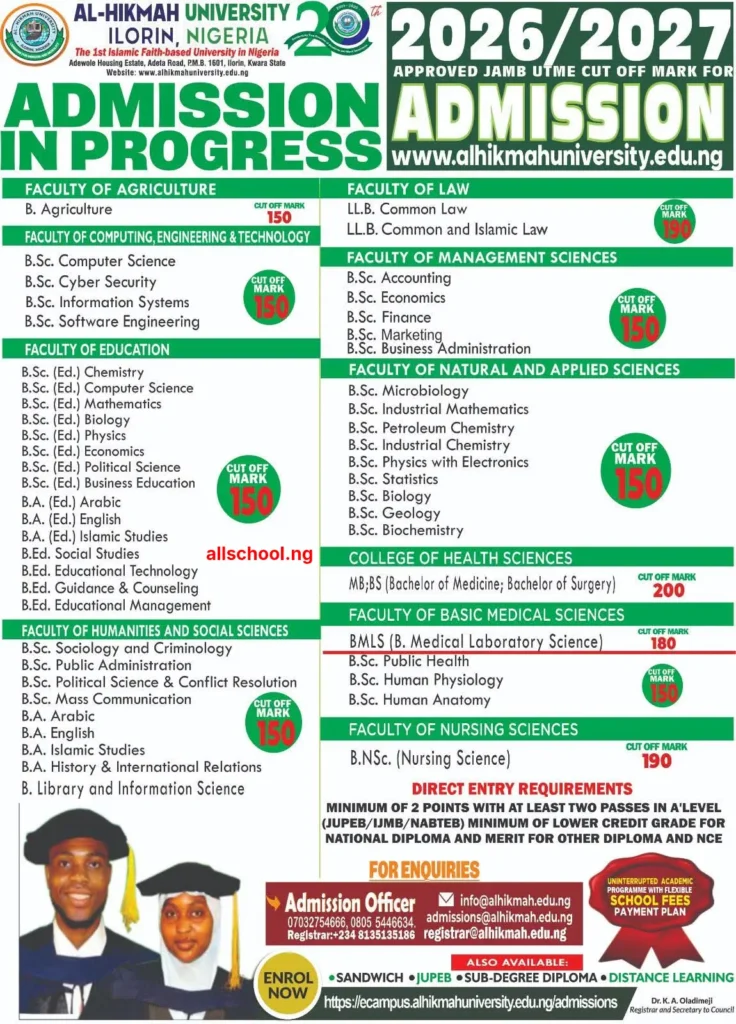
Al-Hikmah University Post-UTME Form for the 2026/2027 Session has been released. The cut-off mark ranges from 150-200 depending on the course. The form cost N2,000.

Applications are hereby invited from suitably qualified candidates for admission into Al-Hikmah University for four (4) year Degree Programmes for the Unified Tertiary Matriculation Examination (U.T.M.E) candidates and three (3) year Degree Programmes for Direct Entry candidates.
ELIGIBILITY & ADMISSION REQUIREMENTS
- Applicants must possess a minimum of five (5) credits in WASSCE/NECO/GCE/NABTEB/SISC Examinations or their equivalent at not more than two (2) sittings in the subjects relevant to their proposed Undergraduate Programmes. English Language at credit level is compulsory for all candidates.
- In addition, credit in Mathematics is compulsory for candidates seeking admission into Degree Programmes in the Faculty of Management Sciences, Natural and Applied Sciences and some Education Courses. Direct Entry admission is also available for applicants with suitable qualifications who obtained Joint Admissions and Matriculation Board (JAMB) DE Form.
Al-Hikmah University Courses and Cut-Off Marks 2026
How to Apply for ALHikmah University Post UTME Form
To apply for the post utme, follow the procedure below:
| Step 1: | If you have Applied for this programme Already, Simply Logon to https://ecampus.alhikmahuniversity.edu.ng/putme/ to proceed |
| Step 2: | Click On Click Here to Apply at the to create your application for profile. |
| Step 3: | You will be required to Supplly your JAMB Registration Number and other basic Information as stated in Step 4 and Click to Proceed button to complete the profile creation. |
| Step 4: | You will be required to update the underlisted data: |
| Valid Phone NumberValid Email AddressNationalityReligionDate of BirthEmailRed background Passport [If Applicable]O’Level Results with Minimum of two(2) sittingsWAEC/NECO Scratch Card Details corresponding to the O’level Results uploaded | |
| Note: Ensure to use a valid email Address and Phone Number you can b contacted on if need arises. Also, always check this mail for updates and information | |
| Step 5: | A notification message will be displayed confirming the successful creation of your profile, Click on the Proceed link to continue your application. Note: A confirmation message will be sent to your email address for future reference [Ensure to use a valid email address]. |
| Step 6: | Login into your personal application account with your new created JAMB number, Note your password is your SURNAME has you have provided during the profile creation stage. |
| Step 7: | You will be required to make payment immediately upon logging into your account. Kindly select your preferred Payment Platform as made available to you. You will be prompted to confirm the transaction, simply click “Make Payment” to proceed |
| .: Payment Instructions 1. To initiate payment, complete the required form and activate your account as applicable, click on the small circle at the right hand with a pointed finger to proceed. 2. On the payment confirmation page; you will find your transaction details including transaction reference, amount to pay, service being paid for, etc. 3. Click on the “Make Payment” to proceed to payment page, where you can pay using any of the available channels including debit or credit cards, internet banking, mobile wallet, bank branch etc. 4. After successful online payment, you will be redirected back to the school portal to complete your application. 5. Note: All Payments are STRICTLY be made via the University Portal, Any payment outside the confirms of the University domains will not be accepted. 6. If the response is successful, navigate back to the service that was paid for to continue to obtain service. | |
| Step 8: | Confirm your Payment Information again and Click on “Make Payment” button to Proceed. |
| Step 9: | Enter your ATM card details |
| Select your ATM card type (e.g Verve or Master Card)Enter your Card Number on the front side of the cardEnter Card Expiry Date and the card CVV2 (the 3 digits on the reverse side of the card)Enter your card pinClick on “Pay” button when you are done | |
| Please note: (Do not Refresh your browser while the process is going on to avoid multiple deductions from your account. If nothing is displayed after 10 minutes, close the browser and restart again). | |
| Note: An Email containing the receipt of the transaction will be sent to your E-mail Account. | |
| Step 10: | Click on the Complete Application Link on your account Menu to upload all the requied documents and complete your application. |
| Step 11: | Print Out your Registration Slip containing summary of your registration. |
| Important Information | |
| If at anytime you need clarification, send an email and always ensure to quote your registration Number in all mails accordinly | |
| Click here Here to send us a message or use our live Chat system to speak to an agent | |
| All Complaints will strictly be treated via our support email and Live chat system. |
CLOSING DATE: Not Specified.
Recommended Articles:
- Check Out Trending Schools Gist
- List Of Schools Whose Post UTME Forms are on Sale
- Top 5 Must-Have for Freshers in Any Nigerian Higher Institution
- 15 Types of Roommates You Will Find in School
- 5 Reasons Most Students Are Not Offered Admission Despite High Post-utme Score
- Jamb Alternatives: 5 Best Ways To Gain Admission Into A University Without JAMB
- Ten Things Every Jambite Must Know Before Entering The University
- 10 Secrets to Making Straight A’s in Varsity of Poly
- Mistakes Students should never Make in Tertiary Institutions
ALLSCHOOL TEAM
--Content Continues after this short break:--
2026 POST-UTME EXAM: Thousands of students will compete for small admission slots this year. Don’t wait till the exam is close before preparing. Join the ALLSCHOOL POST-UTME Online Lesson and start preparing early to secure your admission!
JOIN NOW
---------------
GUARANTEE YOUR ADMISSION: DON'T let Low Screening Score STEAL your Admission this year. Study with your school's Original PDF Post UTME Past Questions, Mock Exam and more CLICK HERE TO INSTALL APP
--Content continues below--
Stories You Shouldn't Have Missed:
- UCH Fire Incident Exaggerated – Spokesperson
- Secondary School Dropout Poses in His Car While Sending Warning Message to Girls Asking Him For School Fees
- WAEC Denies Claims of 2025 Exam Cancellation, Labels Viral Report Fake News
- 23-Year-Old Nigerian Achieves Childhood Dream of Becoming a Lawyer in the UK, Celebrates Milestone
- 82-year-old Veteran Nigerian Journalist Bags PhD as UNILAG holds 53rd convocation
- Buhari to grant scholarship to 3 best young Nigerian scientists Up To PhD Level
- Kogi Government Enacts Law Converting Okene RHO to CUSTECH Teaching Hospital
Join Our 500,000+ Community:
Thank you so much for reading. We will appreciate it if you share this with your loved ones.