
How to Update MyUNN Post-UTME App.
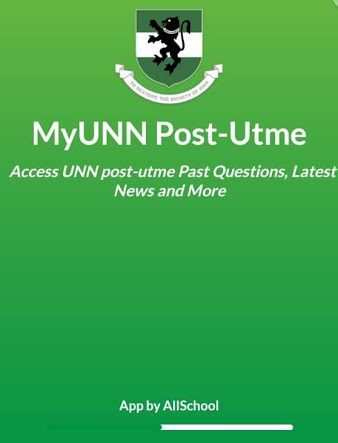
NB: This page is for those who have installed the MyUNN Post-utme App on their phone. If you are yet to install the app, CLICK HERE to install it.
Important Notice:
- If you’re using the old version of the MyUNN Post-utme App, you won’t be able to participate in the weekly contest. Hence Update the update.
If you’re seeing the “UNN FAQ tab” then you’re using the updated version of the app. See screenshot of the “UNN FAQ tab below.

How to Update the App
Step One: Click on icon menu , then click on “Rate Us”. See image below:
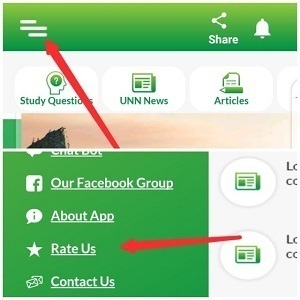
Step Two: Clicking the “Rate Us” tab will take you to play store. You should see two buttons; Uninstall and Update. Click on Update to update the App.
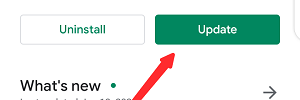
Step Three: If step two worked for you, skip to step four below. If you did not see the Update button above and you are sure that you are not using the new latest version of the app then search the app on play store.
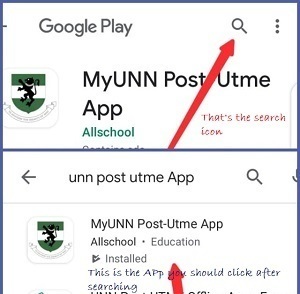
- Click the search icon and type “UNN Post-utme App” then hit the search button. You will see our App; it’s the only APP with the name “MyUNN Post-utme App”.
- Click on it, now you should see the uninstall and update buttons. Click on the Update button to update the App.
Step Four: Then open the App, you’ll see the “weekly contest button”. Click on it and Read the instructions.
Please tell your friends to tell their friends, don’t be selfish. Share this App with friends.
Stories You Shouldn't Have Missed:
- Nigerian Female Lawyer Celebrates As She Bags UK Scholarship to Study Psychology
- Outrageous: Lecturer and his Children beat and strip Lady Naked for fighting his Daughter over Boyfriend (video)
- Lady Shares How She Obtained Her International Passport Without Stress (video)
- Ogun School Wins N250,000 in Essay Competition
- Nigerian Woman Wins Erasmus Mundus Scholarship to Study at Three Top European Universities
- Nigerian Woman Excels in UK, Earns Master’s with Distinction and Becomes Lecturer
- “They want me to fail” – student cries out, claims rats ate parts of his exam prep materials
Join Our 500,000+ Community:
Thank you so much for reading. We will appreciate it if you share this with your loved ones.