
Shehu Shagari University Of Education, Sokoto, notice on registration of admitted students, 2025/2026 academic session.

This is to announce to all students admitted into the Shehu Shagari University of Education for the 2025/2026 academic session that the University Registration has commenced. Candidates admitted should come to the University with their printed JAMB Admission letter and photocopies of their credentials. Registration will commence by 9:00am Prompt.
The Confirmation of Admission for Fresh Students Commences on Monday 24th December, 2025 at the University.
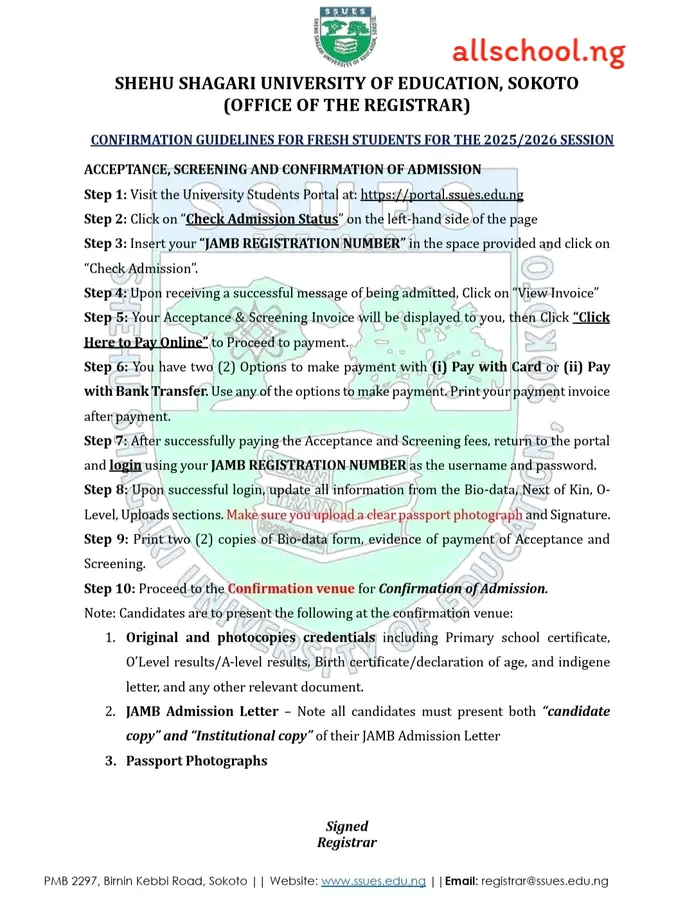
GUIDELINES FOR ACCEPTANCE & SCREENING OF ADMISSION
- Visit the University student portal and https://ssues.edu.ng
- Click on ‘Check Admission Status’ on the left-hand side of the page
- Insert your ‘JAMB Registration Number’ in the space provided and click on ‘Check Admission’
- Click on ‘Proceed to Payment’ to generate an invoice for acceptance and screening
- Follow the instructions on your invoice to make payment
- After successful payment of the acceptance and screening fees, return to the portal and log in using your JAMB registration number as the username and password
- Upon successful log in, update all information from the Bio-data section up to the upload section. Make sure you upload a clear passport photograph with a white background and signature
- Print the Bio-data form and proceed to the Confirmation venue for Confirmation of Admission
Note: Candidates are to present the following at the confirmation center:
- Original and photocopies credentials including Primary school certificate, O’Level results, Birth certificate/declaration of age, and indigene letter.
- JAMB Admission Letter – Note all candidates must present both “candidate copy” and “Institutional copy” of their JAMB Admission Letter
- Passport Photographs
B. PAYMENT OF REGISTRATION FEES
- Step 1: Visit the University Students portal via: https://portal.ssues.edu.ng/
- Step 2: Login using your Admission number as username and Password.
- Step 3: The System will prompt you to change your password, choose a password you will not forget.
- Step 4: Click “Generate Invoice” on the left-hand side of the portal.
- Step 5: Check all the listed items and confirm the Total amount payable. Click on “Generate Invoice” to proceed.
- Step 6: Click on “Print” to print your invoice for reference purposes.
- Step 7: Click on the “Payarena” Logo to Proceed to Payment
- Step 8: Click “Education” by the Left-hand side of the page
- Step 9: Select “Shehu Shagari University of Education” to proceed
- Step 10: Select “Fees” Under Educational Product, Insert the Reference number from the invoice you generated e.g. RE6EF6E79000
- Step 10: Insert a valid email address and click on “Proceed” to make your payment
- Step 11: Insert your “Card” details to make payment.
- Step 12: Print the Slip for reference purposes
- COURSE REGISTRATION
- Upon Successful Payment of Registration fees, the student should visit his/her Department to get a list of courses to register, then:
- Step 1: Visit the University Students portal via: https://portal.ssues.edu.ng/
- Step 2: Login using your Admission number as username and Password.
- Step 3: Click on “Course registration” tab on the left-hand side of the portal
- Step 4: Carefully select all the “Core” courses and the appropriate “Elective” course where applicable.
- Step 5: Cross-check all the selected courses, and then Click on “Submit” to register the courses
- Step 6: Once the Registered courses are approved by the Department, the student should login and print his course form.
- REGISTRATION AT UNIVERSITY LIBRARY
- All students are expected to visit the University Library with copies of their Confirmation letters, evidence of payment of registration fees, course registration forms, passport photographs etc.
- REGISTRATION AT UNIVERSITY CLINIC
- All students are expected to visit the University Clinic with copies of their Confirmation letters, evidence of payment of registration fees, course registration forms, passport photographs etc
Wishing all admitted students a successful registration ahead.
Congratulations
Recommended Articles:
- Check Out Trending Schools Gist
- List Of Schools Whose Post UTME Forms are on Sale
- Top 5 Must-Have for Freshers in Any Nigerian Higher Institution
- 15 Types of Roommates You Will Find in School
- 5 Reasons Most Students Are Not Offered Admission Despite High Post-utme Score
- Jamb Alternatives: 5 Best Ways To Gain Admission Into A University Without JAMB
- Ten Things Every Jambite Must Know Before Entering The University
- 10 Secrets to Making Straight A’s in Varsity of Poly
- Mistakes Students should never Make in Tertiary Institutions
ALLSCHOOL TEAM
Stories You Shouldn't Have Missed:
- Single Mother Accuses Teacher of Stealing Child’s Lunch, Sparks Outrage
- Young Ghanaian Woman Who Worked as a Cleaner to Fund Her Education Graduates as Valedictorian With 3.95 CGPA
- Final-Year Student Dies After Being Hit by Car Driven by Learner at Night
- UK Offers New Work Visa For Teachers, Nigerians Can Apply
- Generous Students Surprised Their Gateman With New Vehicle (Video)
- UNN Laments Power Outage Due to N600M Debt
- UNIJOS Secures NUC Approval for 18 New Academic Programmes
Join Our 500,000+ Community:
Thank you so much for reading. We will appreciate it if you share this with your loved ones.